Stealz for Chrome
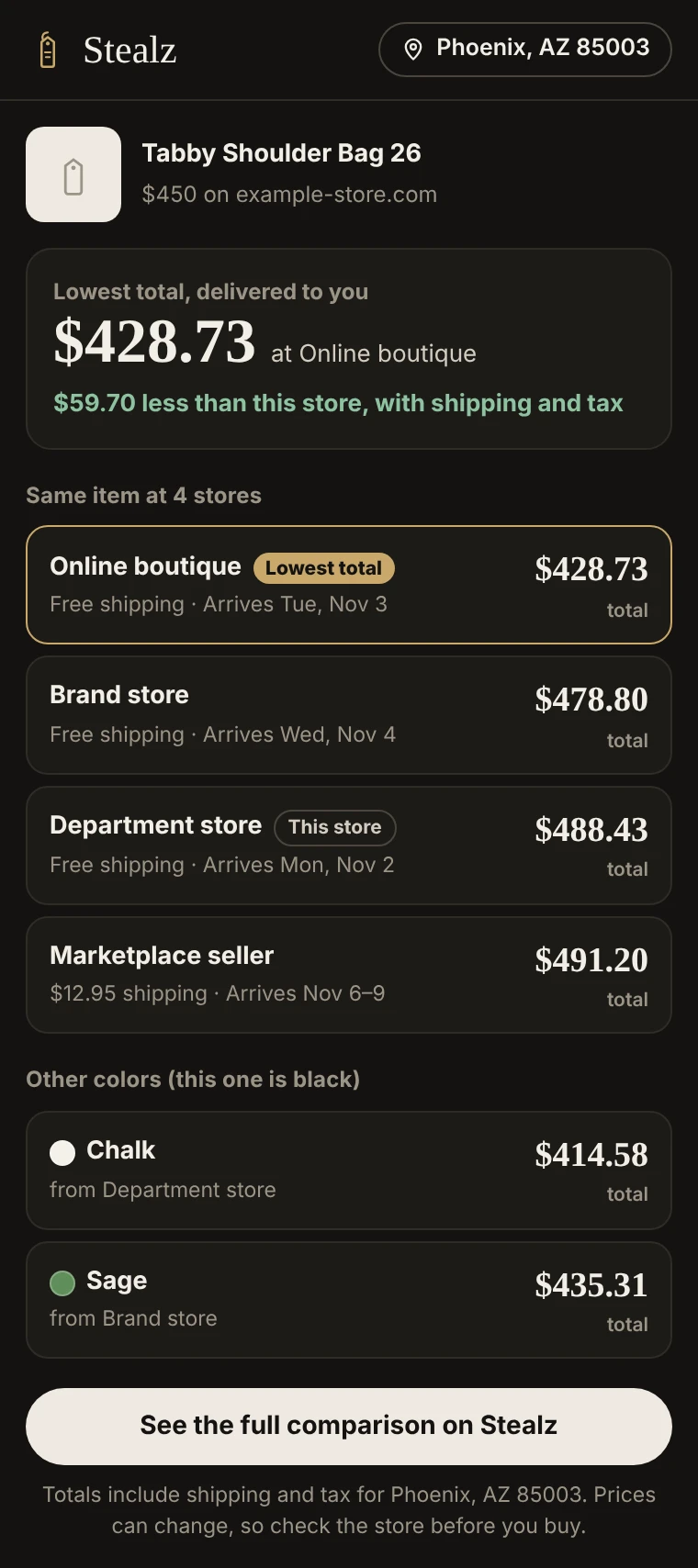
Looking at something on a store’s site? Click Stealz to see what the same item costs everywhere else, delivered to you with shipping and tax, which store is cheapest, and the same item in other colors.
Free. Also works in Edge, Brave and other Chromium browsers.
Works on the page you’re on
Click the Stealz tag on any store’s product page. It reads the item for you, no copying and pasting.
Real totals, cheapest first
Every store’s price plus shipping and tax for your ZIP code, postcode, PIN code or city, and how much you’d save.
Same item, other colors
If another store has it in a different color, you see that too, with the price. Fake shops and used listings are left out.
Install it in a minute
Until Stealz is in the Chrome Web Store, add it straight from the download:
Download and unzip
Unzip stealz-extension.zip. You’ll get a folder called stealz-extension.
Open Chrome’s extensions page
Go to chrome://extensions and turn on Developer mode in the top-right corner.
Load it
Click Load unpacked and choose the stealz-extension folder.
Pin it
Click the puzzle piece next to the address bar, then the pin next to Stealz.
Shop
Open any product page and click the Stealz tag.
What it reads
Stealz only looks at the page you’re on, and only when you click it. To find the item at other stores it sends Stealz the product’s name, brand, price and color, the store’s web address (not the page), and your location for shipping and tax. No account, no browsing history, nothing else from the page. Questions? See how Stealz works.